Prediction Market WebSocket API: Real-Time Data for Devs
Prediction Market WebSocket API: Real-Time Data for Devs
Prediction Market WebSocket API: Real-Time Data for Devs
Unlock powerful real-time prediction market data with the WebSocket API. Simplify your integration with Assymetrix for seamless access.
Prediction Market WebSocket API: Real-Time Data for Devs
The fastest path to normalized, cross-venue prediction market data is a single WebSocket connection to api.assymetrix.com authenticated with an x-api-key header. The Assymetrix Data API unifies Polymarket, Kalshi, and Limitless streams into one canonical schema, built on approximately 1.5 TB of historical data and nearly one billion rows of trading activity. You get market data, trades, and orderbook updates without maintaining three separate venue connections.
To get started immediately:
Create a developer key at dashboard.assymetrix.com/api-keys
Open a TLS WebSocket to
wss://api.assymetrix.com/wsSend your subscription message with the
x-api-keyheader during the handshakeChoose
MARKET_DATA_LITEfor bandwidth-constrained agents orMARKET_DATAfor full orderbook depth
Pro Tip: Start with the lite feed on your first integration. You can always upgrade to full orderbook depth once your message processing loop is stable and you have confirmed your reconnection logic handles drops cleanly.
Key Takeaways
A single Assymetrix WebSocket connection to api.assymetrix.com delivers normalized Polymarket, Kalshi, and Limitless data without the overhead of maintaining three separate venue integrations.
Point | Details |
|---|---|
Create your API key first | Generate an |
Start with lite feeds | Use |
Snapshot before streaming | Fetch a REST snapshot and apply it to local state before accepting any WebSocket deltas. |
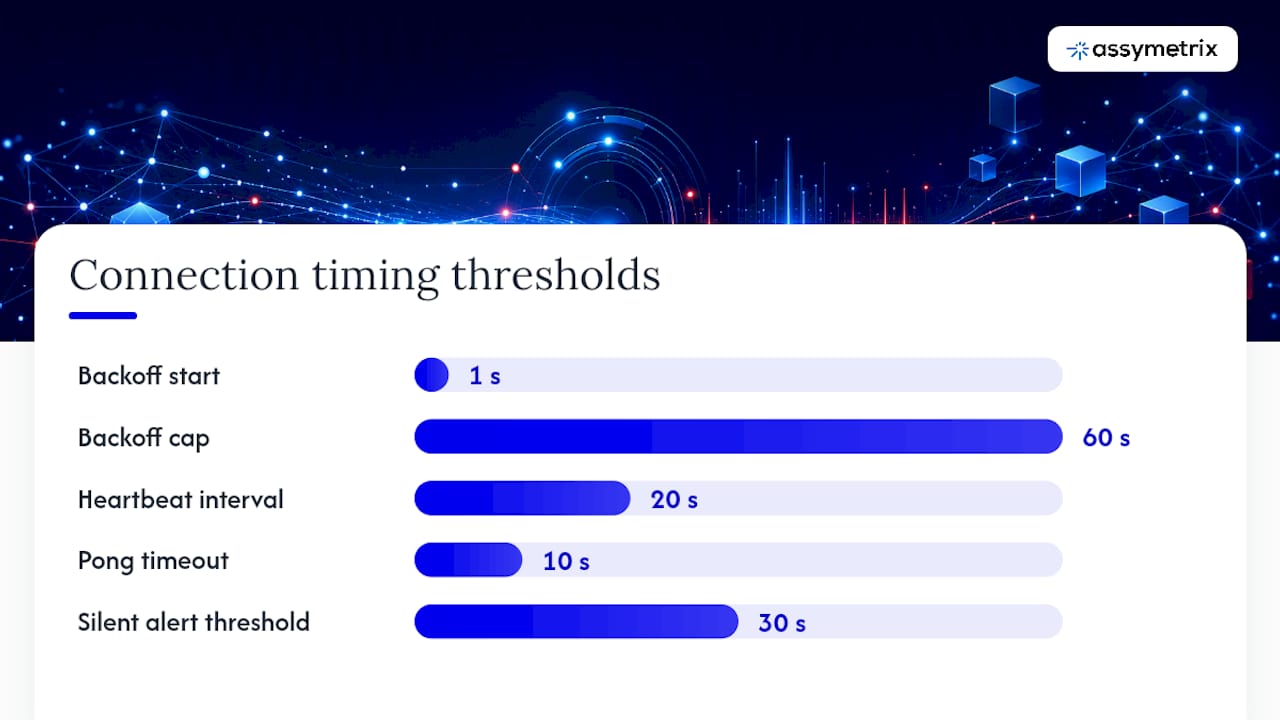
Implement backoff with jitter | Reconnect with exponential backoff starting at 1 second, capped at 60 seconds, with random jitter added. |
Assymetrix unifies three venues | One connection to |
Table of Contents
Why use a WebSocket API for prediction market data?
How to authenticate and open a secure WebSocket connection
What subscription types and message schemas does the API provide?
Quickstart: Python async and TypeScript examples
Production hardening: reconnection, backoff, and monitoring
How Assymetrix normalizes Polymarket, Kalshi, and Limitless into one schema
Hybrid workflows: REST snapshots plus real-time deltas
Subscription limits, rate limits, and architecture for scale
Common errors and how to fix them fast
The case for normalizing at the provider layer, not in your app
Assymetrix gives you one connection for all three venues
Sources
Why use a WebSocket API for prediction market data?
REST polling works for low-frequency queries. For live prediction market apps, it breaks down fast. A poll every second against three venues generates hundreds of HTTP round-trips per minute, each carrying full response payloads regardless of whether prices moved. WebSocket eliminates that overhead with a persistent, server-push connection.
The Websockets Overview documents three canonical real-time channels: prices, trades, and orderbook. Each channel pushes only deltas after the initial snapshot, so bandwidth drops sharply once the connection is established. Server-side debouncing on the provider layer means your client receives pre-batched updates rather than a firehose of individual tick events.
WebSocket vs. REST at a glance:
Dimension | WebSocket | REST polling |
|---|---|---|
Latency | Sub-100ms server push | Round-trip per request |
Bandwidth | Delta updates only | Full payload every call |
Connection overhead | One persistent connection | New TCP+TLS per request |
Server load | Low (push on change) | High (constant polling) |
Best for | Live prices, orderbook, trades | Snapshots, backfill, pagination |
Use REST for initial state rehydration, historical backfill, and paginating active markets. Use WebSocket for everything that needs to reflect the current state of a market in real time.
How to authenticate and open a secure WebSocket connection
Gemini’s prediction markets docs demonstrate the standard pattern: authentication must happen during the WebSocket handshake itself, not after the connection opens. For Assymetrix, that means passing your x-api-key as a header in the upgrade request.
Handshake requirements:
Header:
x-api-key: YOUR_KEYProtocol:
wss://only (TLS required in production)Keys scoped to read-only data access unless your use case requires order submission
Never embed keys in browser-side JavaScript; route WebSocket connections through a server-side proxy
Security note: Rotate keys on a schedule and restrict each key’s scope to the minimum required. To defend against replay attacks, timestamp your subscription messages and validate the
Originheader on any server-side proxy that forwards client connections to the Assymetrix endpoint. A leaked read-only data key is recoverable; a leaked trading key is not.
For server-side Python, pass headers directly in the websockets.connect() call. For Node.js, use the headers option in the ws library constructor. Browsers cannot set arbitrary HTTP upgrade headers, which is why server-side clients are the correct architecture for authenticated WebSocket streams.
What subscription types and message schemas does the API provide?
Polymarket’s Markets WebSocket documents the core subscription types that Assymetrix normalizes across venues: MARKET_DATA, MARKET_DATA_LITE, and TRADE.
Subscription types and their use cases:
Subscription | Data included | Best for |
|---|---|---|
| Full orderbook depth, bid/ask levels, stats | Arbitrage bots, full book reconstruction |
| Best bid, best ask, last trade price, volume | Dashboards, signal monitors, AI agents |
| Individual trade events with price, qty, timestamp | Trade flow analysis, VWAP calculation |
Orderbook/prices | Level-2 orderbook snapshots and price ticks | Market making, depth visualization |
A normalized MARKET_DATA_LITE message looks like this:
{
  "type": "MARKET_DATA_LITE",
  "market_slug": "us-election-2026-senate",
  "venue": "polymarket",
  "bestBid": 0.62,
  "bestAsk": 0.64,
  "lastTradePx": 0.63,
  "bidDepth": 1200,
  "askDepth": 980,
  "state": "OPEN",
  "transactTime": "2026-03-15T14:22:01.004Z"
}
{
  "type": "MARKET_DATA_LITE",
  "market_slug": "us-election-2026-senate",
  "venue": "polymarket",
  "bestBid": 0.62,
  "bestAsk": 0.64,
  "lastTradePx": 0.63,
  "bidDepth": 1200,
  "askDepth": 980,
  "state": "OPEN",
  "transactTime": "2026-03-15T14:22:01.004Z"
}
A TRADE event adds qty and a side field. The full MARKET_DATA message includes nested price objects with multiple bid/ask levels and stats fields: lastTradePx, openInterest, and volume aggregates.
Market state values and their implications:
OPEN: normal trading; accept and process all updatesPREOPEN: market exists but trading has not started; display only, no order submissionSUSPENDED/HALTED: pause order logic immediately; queue or discard incoming deltasEXPIRED: contract settled; close the subscription and archive the final state
Always gate your order-submission logic on state === "OPEN". A bot that ignores state transitions will attempt to trade into a halted or expired market.
Quickstart: Python async and TypeScript examples
The Python prediction market data guide covers the REST pagination pattern. Below is a minimal working async Python client that connects, subscribes, and processes messages.
Python async WebSocket client:
import asyncio
import json
import websockets

API_KEY = "YOUR_ASSYMETRIX_API_KEY"
WS_URL  = "wss://api.assymetrix.com/ws"

async def fetch_active_markets(session, base_url, api_key, page_size=100):
    """Paginate REST endpoint to get active market slugs before subscribing."""
    markets, cursor = [], None
    while True:
        params = {"limit": page_size, "status": "active"}
        if cursor:
            params["cursor"] = cursor
        async with session.get(
            f"{base_url}/markets",
            headers={"x-api-key": api_key},
            params=params
        ) as resp:
            data = await resp.json()
        markets.extend(data["markets"])
        cursor = data.get("next_cursor")
        if not cursor:
            break
    return markets

async def connect_and_subscribe(market_slugs):
    headers = {"x-api-key": API_KEY}
    async with websockets.connect(WS_URL, extra_headers=headers) as ws:
        sub_msg = {
            "action": "subscribe",
            "type": "MARKET_DATA_LITE",
            "markets": market_slugs[:100]   # max 100 per connection
        }
        await ws.send(json.dumps(sub_msg))
        async for raw in ws:
            msg = json.loads(raw)
            handle_message(msg)

def handle_message(msg):
    mtype = msg.get("type")
    if mtype == "MARKET_DATA_LITE":
        print(f"{msg['market_slug']} bid={msg['bestBid']} ask={msg['bestAsk']}")
    elif mtype == "TRADE":
        print(f"TRADE {msg['market_slug']} px={msg['lastTradePx']} qty={msg['qty']}")

asyncio.run(connect_and_subscribe(["us-election-2026-senate", "fed-rate-june-2026"]))
import asyncio
import json
import websockets

API_KEY = "YOUR_ASSYMETRIX_API_KEY"
WS_URL  = "wss://api.assymetrix.com/ws"

async def fetch_active_markets(session, base_url, api_key, page_size=100):
    """Paginate REST endpoint to get active market slugs before subscribing."""
    markets, cursor = [], None
    while True:
        params = {"limit": page_size, "status": "active"}
        if cursor:
            params["cursor"] = cursor
        async with session.get(
            f"{base_url}/markets",
            headers={"x-api-key": api_key},
            params=params
        ) as resp:
            data = await resp.json()
        markets.extend(data["markets"])
        cursor = data.get("next_cursor")
        if not cursor:
            break
    return markets

async def connect_and_subscribe(market_slugs):
    headers = {"x-api-key": API_KEY}
    async with websockets.connect(WS_URL, extra_headers=headers) as ws:
        sub_msg = {
            "action": "subscribe",
            "type": "MARKET_DATA_LITE",
            "markets": market_slugs[:100]   # max 100 per connection
        }
        await ws.send(json.dumps(sub_msg))
        async for raw in ws:
            msg = json.loads(raw)
            handle_message(msg)

def handle_message(msg):
    mtype = msg.get("type")
    if mtype == "MARKET_DATA_LITE":
        print(f"{msg['market_slug']} bid={msg['bestBid']} ask={msg['bestAsk']}")
    elif mtype == "TRADE":
        print(f"TRADE {msg['market_slug']} px={msg['lastTradePx']} qty={msg['qty']}")

asyncio.run(connect_and_subscribe(["us-election-2026-senate", "fed-rate-june-2026"]))
TypeScript server-side pattern:
import WebSocket from "ws";

const ws = new WebSocket("wss://api.assymetrix.com/ws", {
  headers: { "x-api-key": process.env.ASSYMETRIX_API_KEY! }
});

ws.on("open", () => {
  ws.send(JSON.stringify({
    action: "subscribe",
    type: "MARKET_DATA_LITE",
    markets: ["us-election-2026-senate"]
  }));
});

ws.on("message", (data: Buffer) => {
  const msg = JSON.parse(data.toString());
  console.log(msg);
});
import WebSocket from "ws";

const ws = new WebSocket("wss://api.assymetrix.com/ws", {
  headers: { "x-api-key": process.env.ASSYMETRIX_API_KEY! }
});

ws.on("open", () => {
  ws.send(JSON.stringify({
    action: "subscribe",
    type: "MARKET_DATA_LITE",
    markets: ["us-election-2026-senate"]
  }));
});

ws.on("message", (data: Buffer) => {
  const msg = JSON.parse(data.toString());
  console.log(msg);
});
Pre-flight checklist:
Generate your key at
dashboard.assymetrix.com/api-keysTest against the dev endpoint before pointing at production
Choose
MARKET_DATA_LITEunless you need full depthConfirm
transactTimeis ISO 8601 UTC before storingVerify
market_slugmatches your REST-fetched instrument list
Pro Tip: Never run your WebSocket loop and your database writes on the same thread. Push parsed messages onto an asyncio.Queue and consume them in a separate coroutine so a slow write never stalls the receive loop.
Production hardening: reconnection, backoff, and monitoring
A dropped WebSocket connection is not an error condition; it is an expected operational event. The Websockets Overview explicitly recommends reconnection with backoff and subscribing only to the markets you need.
Reconnection pattern:
Detect
closeorerrorevents immediately; do not wait for a timeoutApply exponential backoff with jitter: start at 1 second, cap at 60 seconds, add
random(0, 1)seconds to each intervalOn reconnect, re-subscribe fresh rather than assuming the server preserved session state
Log the close code and reason before reconnecting; code
1008(policy violation) means rotating your key, not retrying
Backpressure and batching:
Push incoming messages onto an in-memory queue; process asynchronously
For high-frequency markets, batch queue reads every 50–100ms rather than processing each message individually
If queue depth exceeds a threshold, drop non-critical lite updates and prioritize trade events
Monitoring checklist:
Track
last_message_timeper subscription; alert if silent for more than 30 seconds on anOPENmarketCount sequence gaps (non-consecutive
transactTimevalues) and trigger a REST snapshot rehydration when detectedExpose a
/healthendpoint that reports WebSocket connection state and queue depth
Pro Tip: Add a heartbeat ping every 20 seconds using ws.ping(). If no pong arrives within 10 seconds, treat the connection as dead and begin the backoff sequence. Some load balancers silently drop idle WebSocket connections without sending a close frame.
How Assymetrix normalizes Polymarket, Kalshi, and Limitless into one schema
Maintaining separate connections to Polymarket, Kalshi, and Limitless means writing three parsers, three reconnection loops, and three sets of instrument identifier mappings. predxt documents exactly this problem: venues expose public versus authenticated streams differently, and their message schemas diverge on field names, timestamp formats, and price scales.
Assymetrix normalizes at the provider layer. You consume one schema.
Key normalization mappings:
Source field | Venue | Assymetrix canonical field |
|---|---|---|
| Polymarket |
|
| Kalshi |
|
| Limitless |
|
Unix ms timestamp | Polymarket |
|
Epoch seconds | Kalshi |
|
Cents (0–100) | Kalshi |
|
Probability float | Polymarket |
|
Always preserve venue and the original venue sequence ID in your local store. You need both for deduplication when the same event arrives via two paths, and for cross-venue arbitrage signals where venue origin is the key differentiator.
Pro Tip: Map instrument identifiers to Assymetrix canonical slugs at ingestion time, not at query time. A late mapping step means your orderbook and trade tables use mixed identifier formats, which breaks any join across venues.
Hybrid workflows: REST snapshots plus real-time deltas
Real-time deltas are only meaningful when applied on top of a correct baseline state. The Prediction Market Data Feed guide covers the full snapshot-then-stream pattern.
When to rehydrate:
On initial connection before accepting any WebSocket deltas
After any reconnect, regardless of how short the outage was
When a sequence gap is detected in
transactTimevalues
Snapshot-then-stream workflow:
Fetch active markets via REST with pagination (see the Python snippet above)
Apply the snapshot to your local state store atomically
Begin consuming WebSocket deltas only after the snapshot write completes
For any delta that arrives with a
transactTimeearlier than your snapshot timestamp, discard it as stale
Practical constraints:
Limit concurrent REST snapshot requests to avoid hitting rate limits during reconnect storms
Apply updates idempotently: use
market_slug+transactTimeas a composite keyHandle contract expirations by checking
state === "EXPIRED"on each update and archiving the final orderbook
Subscription limits, rate limits, and architecture for scale
Polymarket’s WebSocket docs recommend a maximum of 100 markets per subscription connection. Plan your architecture around that constraint from day one.
Scaling options:
Pattern | When to use |
|---|---|
Single connection, 100 markets | Prototyping, small-scale monitoring |
Multiple worker connections | Covering more than 100 active markets |
Fan-out proxy (e.g., Redis pub/sub) | Multiple consumers of the same stream |
Kafka buffer in front of business logic | High-throughput, durable event processing |
REST backfill requests carry their own rate limits separate from WebSocket message volume. Stagger pagination requests during reconnect events rather than firing all pages simultaneously. For enterprise-scale consumers, Assymetrix offers commercial licensing with higher throughput tiers; contact the team via Data for details.
Common errors and how to fix them fast
Auth failures (401 / connection rejected):
Confirm the
x-api-keyheader is sent in the HTTP upgrade request, not as a post-connect messageVerify the key has not been rotated or revoked in the dashboard
Server-side clients only; browsers cannot set upgrade headers for authenticated streams
Malformed messages:
Wrap every
json.loads()call in a try/except and log the raw payload on failureReject unknown fields safely using a schema validator like
pydantic(Python) orzod(TypeScript)Never crash the receive loop on a single bad message; log, skip, and continue
Sequence gaps and duplicates:
Track the last seen
transactTimepermarket_slugOn a gap, pause delta processing and trigger a REST snapshot rehydration
Use
market_slug+transactTimeas a deduplication key before writing to your store
Protocol-level errors:
Close code | Meaning | Action |
|---|---|---|
— | Normal close | Reconnect with backoff |
— | Abnormal close (no frame) | Reconnect immediately, then backoff |
| Policy violation | Rotate key, then reconnect |
— | Server error | Wait 5 seconds, then reconnect |
The case for normalizing at the provider layer, not in your app
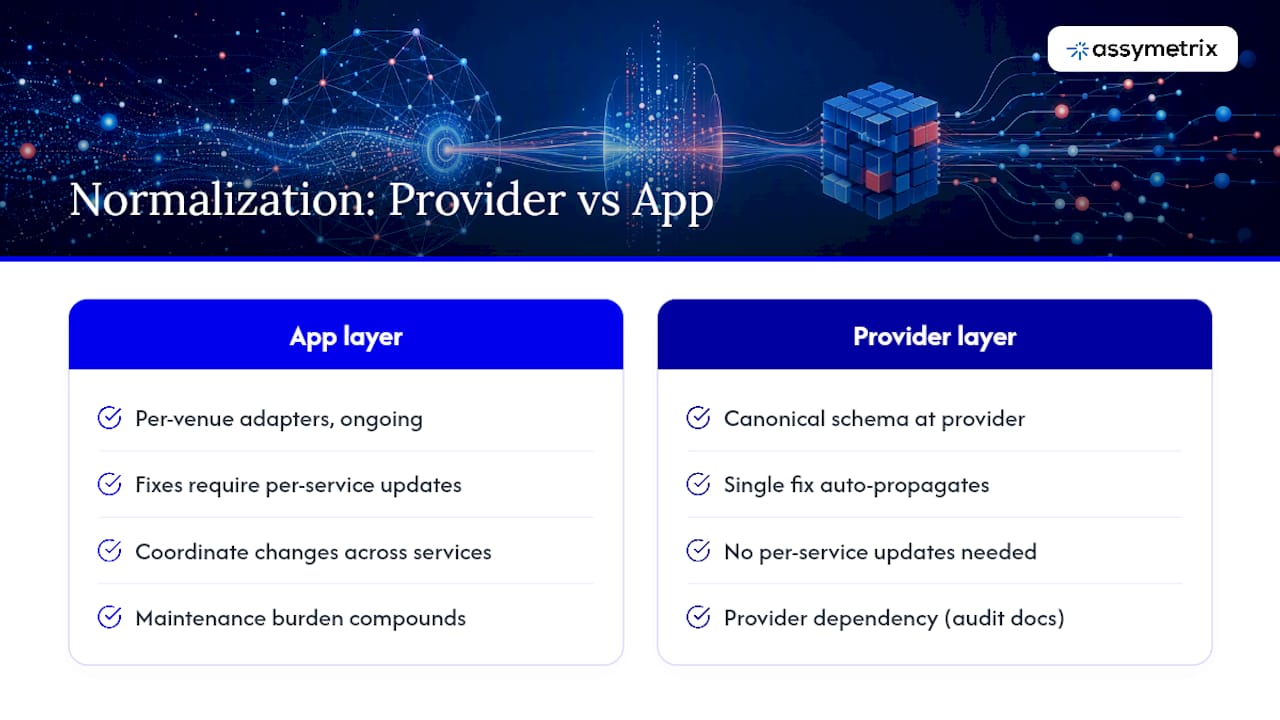
The standard advice is to build your own normalization layer. You write adapters for each venue, maintain them as schemas change, and debug subtle differences in timestamp precision or price scale. That work compounds.
The more defensible design is to normalize once at the provider layer and let every downstream consumer read a single canonical schema. This is not a convenience argument; it is an engineering correctness argument. When Polymarket changes a field name or Kalshi shifts its timestamp format, a single fix at the provider propagates to all consumers automatically. In an app you own, that fix requires coordinating changes across every service that touches raw venue data.
The tradeoff is dependency on the provider’s normalization quality. That is a real risk, and it is worth auditing the schema documentation before committing. For prediction markets specifically, where three venues each have distinct market state machines and identifier conventions, the normalization surface is large enough that building and maintaining it yourself is a significant ongoing cost.
Start with the lite feed, validate the canonical schema against your expected fields, and only then expand to full orderbook depth. The architecture that survives production is the one that was tested incrementally.
Assymetrix gives you one connection for all three venues
Maintaining separate WebSocket connections to Polymarket, Kalshi, and Limitless means three authentication flows, three reconnection loops, and three normalization layers. Assymetrix collapses that to one.
The Assymetrix Data API streams normalized market data, trades, and orderbook updates from all three venues through a single WebSocket at api.assymetrix.com. The same API surfaces cross-venue arbitrage signals and Smart Money wallet tracking for quant workflows that go beyond raw data ingestion. Generate your developer key at dashboard.assymetrix.com/api-keys, run the Python quickstart above against the dev endpoint, and contact the team at Data for enterprise licensing and higher throughput tiers.
Sources
The primary references for this guide:
Which source to consult for what: Use the Polymarket docs for message schema field-level detail. Use the Websockets Overview for reconnection logic and dev endpoint testing. Use predxt for venue normalization patterns and the public/private stream matrix. Use the Assymetrix Data API docs for the unified endpoint, key management, and production onboarding.
FAQ
What is the connection URL for the Assymetrix WebSocket?
Connect to wss://api.assymetrix.com/ws with your x-api-key header included in the HTTP upgrade request.
How many markets can one WebSocket connection subscribe to?
Polymarket’s WebSocket documentation recommends a maximum of 100 markets per connection; plan to shard across multiple worker connections for larger coverage.
Why should I use a server-side client instead of a browser client?
Browsers cannot set arbitrary HTTP upgrade headers, so authenticated WebSocket streams require a server-side proxy or backend client to pass the x-api-key header during the handshake.
What should I do when I detect a sequence gap in the stream?
Pause delta processing, trigger a REST snapshot rehydration for the affected markets, and resume only after applying the fresh snapshot to your local state.
How does Assymetrix handle normalization across Polymarket, Kalshi, and Limitless?
Assymetrix maps venue-specific identifiers, timestamp formats, and price scales to a single canonical schema at the provider layer, so your application consumes one consistent message format regardless of the source venue.
Prediction Market WebSocket API: Real-Time Data for Devs
The fastest path to normalized, cross-venue prediction market data is a single WebSocket connection to api.assymetrix.com authenticated with an x-api-key header. The Assymetrix Data API unifies Polymarket, Kalshi, and Limitless streams into one canonical schema, built on approximately 1.5 TB of historical data and nearly one billion rows of trading activity. You get market data, trades, and orderbook updates without maintaining three separate venue connections.
To get started immediately:
Create a developer key at dashboard.assymetrix.com/api-keys
Open a TLS WebSocket to
wss://api.assymetrix.com/wsSend your subscription message with the
x-api-keyheader during the handshakeChoose
MARKET_DATA_LITEfor bandwidth-constrained agents orMARKET_DATAfor full orderbook depth
Pro Tip: Start with the lite feed on your first integration. You can always upgrade to full orderbook depth once your message processing loop is stable and you have confirmed your reconnection logic handles drops cleanly.
Key Takeaways
A single Assymetrix WebSocket connection to api.assymetrix.com delivers normalized Polymarket, Kalshi, and Limitless data without the overhead of maintaining three separate venue integrations.
Point | Details |
|---|---|
Create your API key first | Generate an |
Start with lite feeds | Use |
Snapshot before streaming | Fetch a REST snapshot and apply it to local state before accepting any WebSocket deltas. |
Implement backoff with jitter | Reconnect with exponential backoff starting at 1 second, capped at 60 seconds, with random jitter added. |
Assymetrix unifies three venues | One connection to |
Table of Contents
Why use a WebSocket API for prediction market data?
How to authenticate and open a secure WebSocket connection
What subscription types and message schemas does the API provide?
Quickstart: Python async and TypeScript examples
Production hardening: reconnection, backoff, and monitoring
How Assymetrix normalizes Polymarket, Kalshi, and Limitless into one schema
Hybrid workflows: REST snapshots plus real-time deltas
Subscription limits, rate limits, and architecture for scale
Common errors and how to fix them fast
The case for normalizing at the provider layer, not in your app
Assymetrix gives you one connection for all three venues
Sources
Why use a WebSocket API for prediction market data?
REST polling works for low-frequency queries. For live prediction market apps, it breaks down fast. A poll every second against three venues generates hundreds of HTTP round-trips per minute, each carrying full response payloads regardless of whether prices moved. WebSocket eliminates that overhead with a persistent, server-push connection.
The Websockets Overview documents three canonical real-time channels: prices, trades, and orderbook. Each channel pushes only deltas after the initial snapshot, so bandwidth drops sharply once the connection is established. Server-side debouncing on the provider layer means your client receives pre-batched updates rather than a firehose of individual tick events.
WebSocket vs. REST at a glance:
Dimension | WebSocket | REST polling |
|---|---|---|
Latency | Sub-100ms server push | Round-trip per request |
Bandwidth | Delta updates only | Full payload every call |
Connection overhead | One persistent connection | New TCP+TLS per request |
Server load | Low (push on change) | High (constant polling) |
Best for | Live prices, orderbook, trades | Snapshots, backfill, pagination |
Use REST for initial state rehydration, historical backfill, and paginating active markets. Use WebSocket for everything that needs to reflect the current state of a market in real time.
How to authenticate and open a secure WebSocket connection
Gemini’s prediction markets docs demonstrate the standard pattern: authentication must happen during the WebSocket handshake itself, not after the connection opens. For Assymetrix, that means passing your x-api-key as a header in the upgrade request.
Handshake requirements:
Header:
x-api-key: YOUR_KEYProtocol:
wss://only (TLS required in production)Keys scoped to read-only data access unless your use case requires order submission
Never embed keys in browser-side JavaScript; route WebSocket connections through a server-side proxy
Security note: Rotate keys on a schedule and restrict each key’s scope to the minimum required. To defend against replay attacks, timestamp your subscription messages and validate the
Originheader on any server-side proxy that forwards client connections to the Assymetrix endpoint. A leaked read-only data key is recoverable; a leaked trading key is not.
For server-side Python, pass headers directly in the websockets.connect() call. For Node.js, use the headers option in the ws library constructor. Browsers cannot set arbitrary HTTP upgrade headers, which is why server-side clients are the correct architecture for authenticated WebSocket streams.
What subscription types and message schemas does the API provide?
Polymarket’s Markets WebSocket documents the core subscription types that Assymetrix normalizes across venues: MARKET_DATA, MARKET_DATA_LITE, and TRADE.
Subscription types and their use cases:
Subscription | Data included | Best for |
|---|---|---|
| Full orderbook depth, bid/ask levels, stats | Arbitrage bots, full book reconstruction |
| Best bid, best ask, last trade price, volume | Dashboards, signal monitors, AI agents |
| Individual trade events with price, qty, timestamp | Trade flow analysis, VWAP calculation |
Orderbook/prices | Level-2 orderbook snapshots and price ticks | Market making, depth visualization |
A normalized MARKET_DATA_LITE message looks like this:
{
  "type": "MARKET_DATA_LITE",
  "market_slug": "us-election-2026-senate",
  "venue": "polymarket",
  "bestBid": 0.62,
  "bestAsk": 0.64,
  "lastTradePx": 0.63,
  "bidDepth": 1200,
  "askDepth": 980,
  "state": "OPEN",
  "transactTime": "2026-03-15T14:22:01.004Z"
}
A TRADE event adds qty and a side field. The full MARKET_DATA message includes nested price objects with multiple bid/ask levels and stats fields: lastTradePx, openInterest, and volume aggregates.
Market state values and their implications:
OPEN: normal trading; accept and process all updatesPREOPEN: market exists but trading has not started; display only, no order submissionSUSPENDED/HALTED: pause order logic immediately; queue or discard incoming deltasEXPIRED: contract settled; close the subscription and archive the final state
Always gate your order-submission logic on state === "OPEN". A bot that ignores state transitions will attempt to trade into a halted or expired market.
Quickstart: Python async and TypeScript examples
The Python prediction market data guide covers the REST pagination pattern. Below is a minimal working async Python client that connects, subscribes, and processes messages.
Python async WebSocket client:
import asyncio
import json
import websockets

API_KEY = "YOUR_ASSYMETRIX_API_KEY"
WS_URL  = "wss://api.assymetrix.com/ws"

async def fetch_active_markets(session, base_url, api_key, page_size=100):
    """Paginate REST endpoint to get active market slugs before subscribing."""
    markets, cursor = [], None
    while True:
        params = {"limit": page_size, "status": "active"}
        if cursor:
            params["cursor"] = cursor
        async with session.get(
            f"{base_url}/markets",
            headers={"x-api-key": api_key},
            params=params
        ) as resp:
            data = await resp.json()
        markets.extend(data["markets"])
        cursor = data.get("next_cursor")
        if not cursor:
            break
    return markets

async def connect_and_subscribe(market_slugs):
    headers = {"x-api-key": API_KEY}
    async with websockets.connect(WS_URL, extra_headers=headers) as ws:
        sub_msg = {
            "action": "subscribe",
            "type": "MARKET_DATA_LITE",
            "markets": market_slugs[:100]   # max 100 per connection
        }
        await ws.send(json.dumps(sub_msg))
        async for raw in ws:
            msg = json.loads(raw)
            handle_message(msg)

def handle_message(msg):
    mtype = msg.get("type")
    if mtype == "MARKET_DATA_LITE":
        print(f"{msg['market_slug']} bid={msg['bestBid']} ask={msg['bestAsk']}")
    elif mtype == "TRADE":
        print(f"TRADE {msg['market_slug']} px={msg['lastTradePx']} qty={msg['qty']}")

asyncio.run(connect_and_subscribe(["us-election-2026-senate", "fed-rate-june-2026"]))
TypeScript server-side pattern:
import WebSocket from "ws";

const ws = new WebSocket("wss://api.assymetrix.com/ws", {
  headers: { "x-api-key": process.env.ASSYMETRIX_API_KEY! }
});

ws.on("open", () => {
  ws.send(JSON.stringify({
    action: "subscribe",
    type: "MARKET_DATA_LITE",
    markets: ["us-election-2026-senate"]
  }));
});

ws.on("message", (data: Buffer) => {
  const msg = JSON.parse(data.toString());
  console.log(msg);
});
Pre-flight checklist:
Generate your key at
dashboard.assymetrix.com/api-keysTest against the dev endpoint before pointing at production
Choose
MARKET_DATA_LITEunless you need full depthConfirm
transactTimeis ISO 8601 UTC before storingVerify
market_slugmatches your REST-fetched instrument list
Pro Tip: Never run your WebSocket loop and your database writes on the same thread. Push parsed messages onto an asyncio.Queue and consume them in a separate coroutine so a slow write never stalls the receive loop.
Production hardening: reconnection, backoff, and monitoring
A dropped WebSocket connection is not an error condition; it is an expected operational event. The Websockets Overview explicitly recommends reconnection with backoff and subscribing only to the markets you need.
Reconnection pattern:
Detect
closeorerrorevents immediately; do not wait for a timeoutApply exponential backoff with jitter: start at 1 second, cap at 60 seconds, add
random(0, 1)seconds to each intervalOn reconnect, re-subscribe fresh rather than assuming the server preserved session state
Log the close code and reason before reconnecting; code
1008(policy violation) means rotating your key, not retrying
Backpressure and batching:
Push incoming messages onto an in-memory queue; process asynchronously
For high-frequency markets, batch queue reads every 50–100ms rather than processing each message individually
If queue depth exceeds a threshold, drop non-critical lite updates and prioritize trade events
Monitoring checklist:
Track
last_message_timeper subscription; alert if silent for more than 30 seconds on anOPENmarketCount sequence gaps (non-consecutive
transactTimevalues) and trigger a REST snapshot rehydration when detectedExpose a
/healthendpoint that reports WebSocket connection state and queue depth
Pro Tip: Add a heartbeat ping every 20 seconds using ws.ping(). If no pong arrives within 10 seconds, treat the connection as dead and begin the backoff sequence. Some load balancers silently drop idle WebSocket connections without sending a close frame.
How Assymetrix normalizes Polymarket, Kalshi, and Limitless into one schema
Maintaining separate connections to Polymarket, Kalshi, and Limitless means writing three parsers, three reconnection loops, and three sets of instrument identifier mappings. predxt documents exactly this problem: venues expose public versus authenticated streams differently, and their message schemas diverge on field names, timestamp formats, and price scales.
Assymetrix normalizes at the provider layer. You consume one schema.
Key normalization mappings:
Source field | Venue | Assymetrix canonical field |
|---|---|---|
| Polymarket |
|
| Kalshi |
|
| Limitless |
|
Unix ms timestamp | Polymarket |
|
Epoch seconds | Kalshi |
|
Cents (0–100) | Kalshi |
|
Probability float | Polymarket |
|
Always preserve venue and the original venue sequence ID in your local store. You need both for deduplication when the same event arrives via two paths, and for cross-venue arbitrage signals where venue origin is the key differentiator.
Pro Tip: Map instrument identifiers to Assymetrix canonical slugs at ingestion time, not at query time. A late mapping step means your orderbook and trade tables use mixed identifier formats, which breaks any join across venues.
Hybrid workflows: REST snapshots plus real-time deltas
Real-time deltas are only meaningful when applied on top of a correct baseline state. The Prediction Market Data Feed guide covers the full snapshot-then-stream pattern.
When to rehydrate:
On initial connection before accepting any WebSocket deltas
After any reconnect, regardless of how short the outage was
When a sequence gap is detected in
transactTimevalues
Snapshot-then-stream workflow:
Fetch active markets via REST with pagination (see the Python snippet above)
Apply the snapshot to your local state store atomically
Begin consuming WebSocket deltas only after the snapshot write completes
For any delta that arrives with a
transactTimeearlier than your snapshot timestamp, discard it as stale
Practical constraints:
Limit concurrent REST snapshot requests to avoid hitting rate limits during reconnect storms
Apply updates idempotently: use
market_slug+transactTimeas a composite keyHandle contract expirations by checking
state === "EXPIRED"on each update and archiving the final orderbook
Subscription limits, rate limits, and architecture for scale
Polymarket’s WebSocket docs recommend a maximum of 100 markets per subscription connection. Plan your architecture around that constraint from day one.
Scaling options:
Pattern | When to use |
|---|---|
Single connection, 100 markets | Prototyping, small-scale monitoring |
Multiple worker connections | Covering more than 100 active markets |
Fan-out proxy (e.g., Redis pub/sub) | Multiple consumers of the same stream |
Kafka buffer in front of business logic | High-throughput, durable event processing |
REST backfill requests carry their own rate limits separate from WebSocket message volume. Stagger pagination requests during reconnect events rather than firing all pages simultaneously. For enterprise-scale consumers, Assymetrix offers commercial licensing with higher throughput tiers; contact the team via Data for details.
Common errors and how to fix them fast
Auth failures (401 / connection rejected):
Confirm the
x-api-keyheader is sent in the HTTP upgrade request, not as a post-connect messageVerify the key has not been rotated or revoked in the dashboard
Server-side clients only; browsers cannot set upgrade headers for authenticated streams
Malformed messages:
Wrap every
json.loads()call in a try/except and log the raw payload on failureReject unknown fields safely using a schema validator like
pydantic(Python) orzod(TypeScript)Never crash the receive loop on a single bad message; log, skip, and continue
Sequence gaps and duplicates:
Track the last seen
transactTimepermarket_slugOn a gap, pause delta processing and trigger a REST snapshot rehydration
Use
market_slug+transactTimeas a deduplication key before writing to your store
Protocol-level errors:
Close code | Meaning | Action |
|---|---|---|
— | Normal close | Reconnect with backoff |
— | Abnormal close (no frame) | Reconnect immediately, then backoff |
| Policy violation | Rotate key, then reconnect |
— | Server error | Wait 5 seconds, then reconnect |
The case for normalizing at the provider layer, not in your app
The standard advice is to build your own normalization layer. You write adapters for each venue, maintain them as schemas change, and debug subtle differences in timestamp precision or price scale. That work compounds.
The more defensible design is to normalize once at the provider layer and let every downstream consumer read a single canonical schema. This is not a convenience argument; it is an engineering correctness argument. When Polymarket changes a field name or Kalshi shifts its timestamp format, a single fix at the provider propagates to all consumers automatically. In an app you own, that fix requires coordinating changes across every service that touches raw venue data.
The tradeoff is dependency on the provider’s normalization quality. That is a real risk, and it is worth auditing the schema documentation before committing. For prediction markets specifically, where three venues each have distinct market state machines and identifier conventions, the normalization surface is large enough that building and maintaining it yourself is a significant ongoing cost.
Start with the lite feed, validate the canonical schema against your expected fields, and only then expand to full orderbook depth. The architecture that survives production is the one that was tested incrementally.
Assymetrix gives you one connection for all three venues
Maintaining separate WebSocket connections to Polymarket, Kalshi, and Limitless means three authentication flows, three reconnection loops, and three normalization layers. Assymetrix collapses that to one.
The Assymetrix Data API streams normalized market data, trades, and orderbook updates from all three venues through a single WebSocket at api.assymetrix.com. The same API surfaces cross-venue arbitrage signals and Smart Money wallet tracking for quant workflows that go beyond raw data ingestion. Generate your developer key at dashboard.assymetrix.com/api-keys, run the Python quickstart above against the dev endpoint, and contact the team at Data for enterprise licensing and higher throughput tiers.
Sources
The primary references for this guide:
Which source to consult for what: Use the Polymarket docs for message schema field-level detail. Use the Websockets Overview for reconnection logic and dev endpoint testing. Use predxt for venue normalization patterns and the public/private stream matrix. Use the Assymetrix Data API docs for the unified endpoint, key management, and production onboarding.
FAQ
What is the connection URL for the Assymetrix WebSocket?
Connect to wss://api.assymetrix.com/ws with your x-api-key header included in the HTTP upgrade request.
How many markets can one WebSocket connection subscribe to?
Polymarket’s WebSocket documentation recommends a maximum of 100 markets per connection; plan to shard across multiple worker connections for larger coverage.
Why should I use a server-side client instead of a browser client?
Browsers cannot set arbitrary HTTP upgrade headers, so authenticated WebSocket streams require a server-side proxy or backend client to pass the x-api-key header during the handshake.
What should I do when I detect a sequence gap in the stream?
Pause delta processing, trigger a REST snapshot rehydration for the affected markets, and resume only after applying the fresh snapshot to your local state.
How does Assymetrix handle normalization across Polymarket, Kalshi, and Limitless?
Assymetrix maps venue-specific identifiers, timestamp formats, and price scales to a single canonical schema at the provider layer, so your application consumes one consistent message format regardless of the source venue.
Other Blog


